SrTiO3 Surface Energies of (011) and (001) Terminations
1. Introduction
This tutorial calculates the cleavage, relaxation and surface energies of five SrTiO3 slabs, reproducing Table VII of the following manuscript:
Manuscript
R. I. Eglitis and David Vanderbilt, "First-principles calculations of atomic and electronic structure of SrTiO3 (001) and (011) surfaces", Physical Review B 77, 195408 (2008). DOI: 10.1103/PhysRevB.77.195408. 1
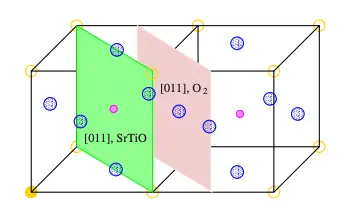
This tutorial builds upon the SrTiO3 Slab tutorial, where the slabs are created. The (011) planes of SrTiO3 alternate between SrTiO and O2 (FIG. 2 of the manuscript), both charged, so a slab cut on whole planes is either polar or charged. The manuscript removes atoms from both outer planes of a symmetric seven-plane slab and obtains three neutral, mirror-symmetric terminations: TiO (16 atoms), Sr (14 atoms) and O (15 atoms, the only stoichiometric one). The (001) SrO- and TiO2-terminated seven-plane slabs (17 and 18 atoms) are computed as well.
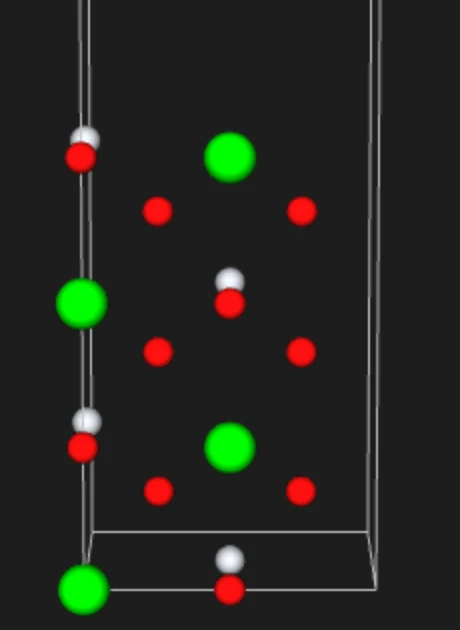
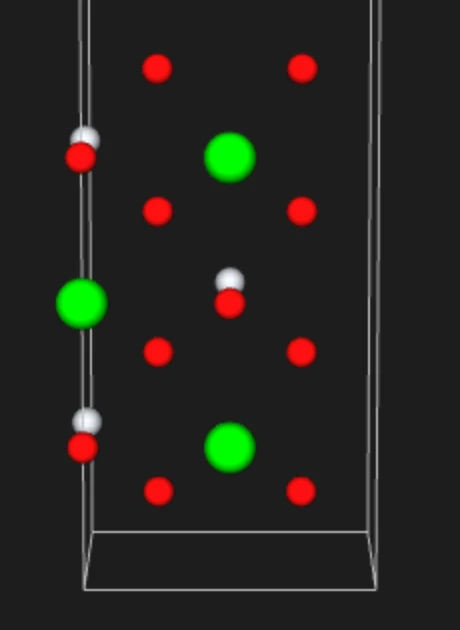
The structure notebook also builds the two symmetric whole-plane (011) slabs that the manuscript starts from, SrTiO-terminated (FIG. 3(c)) and O2-terminated (FIG. 3(b)), shown here in the Wave viewer:
2. Prerequisites
The notebook loads six materials from the uploads folder or the account's materials collection by exact name, and raises when one is missing: the bulk cell SrTiO3, Strontium Titanate, CUB (Pm-3m) 3D (Bulk), mp-5229 and the slabs SrTiO3(011) TiO-terminated 7 planes, SrTiO3(011) Sr-terminated 7 planes, SrTiO3(011) O-terminated 7 planes, SrTiO3(001) SrO-terminated 7 planes and SrTiO3(001) TiO2-terminated 7 planes. All six are saved by the notebook of the SrTiO3 Slab tutorial, which should be run first. It also saves the two charged whole-plane (011) slabs of FIG. 3(b) and 3(c); no energy is computed for them.
3. Workflow overview
Every energy comes from total energy jobs and the manuscript's Eqs. (1)-(5), evaluated in the notebook. The slabs of one group are stoichiometric together: TiO + Sr contain six bulk units, SrO + TiO2 seven, and the O-terminated slab three on its own. Cleaving the crystal into the slabs of a group creates two surfaces per slab, and the manuscript divides the energy equally among them:
E_cleav = [Σ E_slab(unrelaxed) − n E_bulk] / (2 m)
with n the number of bulk units and m the number of slabs in the group. Each slab then adds its own relaxation energy, both faces relaxing, E_rel = [E_slab(relaxed) − E_slab(unrelaxed)] / 2, and its surface energy is E_surf = E_cleav + E_rel. The steps are:
- Set up the environment and parameters: material names, Density Functional Theory (DFT) model, relaxation switch, and compute settings
- Authenticate and initialize API client: connect to the platform
- Load the materials: the bulk cell and the five slabs, with their compositions printed
- Configure the shared model and k-grid: one DFT model and one k-point density for every cell
- Configure compute resources: select cluster, queue, and processor settings
- Run the Total Energy jobs: one on each cell as cut
- Relax the slabs: only when
RELAXis set, at fixed cell, all atoms - Retrieve the results: the total energies, and the cleavage, relaxation and surface energies
- Compare with the manuscript: the computed values beside Table VII
4. Calculation parameters
| this tutorial | Eglitis & Vanderbilt | |
|---|---|---|
| Code | Quantum ESPRESSO | CRYSTAL-2003 |
| Functional | Perdew-Burke-Ernzerhof (PBE) | hybrid Becke three-parameter Perdew-Wang (B3PW) |
| Basis | plane waves, Garrity-Bennett-Rabe-Vanderbilt (GBRV) ultrasoft pseudopotentials, 40 / 200 Ry | Gaussian basis sets |
| Lattice constant | 3.913 Å (Standata, mp-5229) | 3.904 Å (B3PW) |
| Slabs | seven planes, 1×1, 9.8 Å of vacuum (011), 13.9 Å (001) | seven planes, 1×1, no vacuum (two-dimensional slab model) |
| k-points | density 6.5 Å⁻¹: 11×8×1 (011), 11×11×1 (001), 11×11×11 bulk | 8×8 |
| Relaxation | every atom, fixed cell, Quantum ESPRESSO's default force threshold | near-surface planes (two in Sec. III.B, three in Table VII) |
| Spin | spin-restricted | not stated |
The functional is the main difference: the manuscript gives no PBE surface energies. Cell 1.4 holds these settings:
1 2 3 4 5 | |
5. Step-by-step instructions
5.1. Open the notebook
Navigate to the API examples repository and open the simulation notebook:
1 | |
5.2. Set the material names
Cell 1.2 names the materials and groups the slabs that share a cleavage energy:
1 2 3 4 5 6 7 8 | |
5.3. Run the notebook
Execute all cells by selecting Run > Run All Cells. The notebook authenticates with the platform, then runs the steps listed in section 3.
5.4. Read the results
The last cell prints, per termination, the computed cleavage energy beside the manuscript's and, with RELAX = True, the relaxation and surface energies:
1 2 3 4 5 6 | |
6. Comparison with the manuscript
Energies per 1×1 surface cell, in eV: Table VII of the manuscript (B3PW) and this tutorial (PBE).
| Termination | Value | Manuscript | Ours |
|---|---|---|---|
| (011) TiO | Cleavage | 4.61 | 3.30 |
| Relaxation | −1.55 | −1.27 | |
| Surface | 3.06 | 2.03 | |
| (011) Sr | Cleavage | 4.61 | 3.30 |
| Relaxation | −1.95 | −1.05 | |
| Surface | 2.66 | 2.25 | |
| (011) O | Cleavage | 3.36 | 2.71 |
| Relaxation | −1.32 | −1.42 | |
| Surface | 2.04 | 1.28 | |
| (001) SrO | Cleavage | 1.39 | 1.10 |
| Relaxation | −0.24 | −0.17 | |
| Surface | 1.15 | 0.93 | |
| (001) TiO2 | Cleavage | 1.39 | 1.10 |
| Relaxation | −0.16 | −0.16 | |
| Surface | 1.23 | 0.94 |
7. Customization options
7.1. Run the relaxed regime
The default RELAX = False computes the cleavage energies from six Total Energy jobs. Setting RELAX = True in cell 1.3 adds one fixed-cell relaxation per slab, five jobs, and prints the relaxation and surface energies as well. The relaxed energy is the relaxation job's own.
7.2. Adjust computational resources
The default, CLUSTER_NAME = None, uses the account's first listed cluster; setting a specific name picks that cluster instead, and a name that is not available makes the notebook stop and list the ones that are.
7.3. Use thicker slabs
The manuscript checks that nine-plane slabs change the energies by less than 0.01 eV. Setting NUMBER_OF_PLANES = 9 in the structure notebook saves the slabs as ... 9 planes; here, the names in cell 1.2 then change to those.
8. Troubleshooting
8.1. Material not found
Loading raises when a name is missing from the uploads folder and the account's materials collection. Run the notebook of the SrTiO3 Slab tutorial, which saves the six materials under the names in cell 1.2.
9. Interactive JupyterLite notebook
The following JupyterLite notebook calculates the surface energies of the SrTiO3 slabs. Select Run > Run All Cells.
10. References
-
R. I. Eglitis and David Vanderbilt. First-principles calculations of atomic and electronic structure of srtio3 (001) and (011) surfaces. Phys. Rev. B, 77:195408, May 2008. URL: https://link.aps.org/doi/10.1103/PhysRevB.77.195408. ↩