Vacancy Point Defects in Hexagonal Boron Nitride (Formation Energy)
1. Introduction
This tutorial calculates the formation energy of a neutral boron vacancy in h-BN, reproducing results from the following manuscript:
Manuscript
Fabian Bertoldo, Sajid Ali, Simone Manti & Kristian S. Thygesen, "Quantum point defects in 2D materials - the QPOD database", npj Computational Materials, 2022. DOI:10.1038/s41524-022-00730-w. 1
This tutorial builds upon the Vacancy Point Defect in h-BN tutorial, where the defective structure is created. Here, the formation energy is calculated using Quantum ESPRESSO and compared with QPOD's value for the same defect.
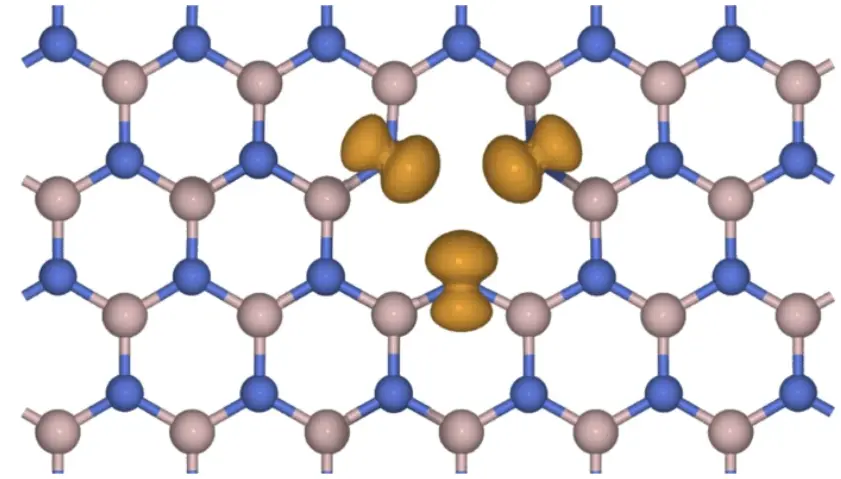
The figure below shows the boron vacancy in h-BN from the manuscript (Figure 6):
1.1. What is being reproduced
QPOD's entry 1BN-1.2d.v_B.0.1 gives the
neutral vacancy formation energy at standard-state chemical potentials:
| E_f (eV) | |
|---|---|
| QPOD, standard states | 10.18 |
| QPOD, B-poor | 8.89 |
Only the neutral (q = 0) defect is compared; QPOD's charged states need a finite-size correction this workflow does not apply.
2. Prerequisites
Before starting this tutorial, one of the following steps should be completed:
- Complete the Vacancy Point Defect in h-BN tutorial,
using the
defect_point_vacancy_boron_nitride.ipynbnotebook embedded in its section 6, to create and saveh-BN supercellandB-vacancy h-BN, OR - Have both materials saved in the
uploadsfolder or in the account's materials collection
3. Workflow overview
The defect formation energy calculation consists of the following steps:
- Set up the environment and parameters: Configure material names, the DFT model, and compute resources
- Authenticate and initialize API client: Connect to the platform
- Load materials: Import the pristine and defective structures, and resolve the elemental reference materials
- Submit prerequisite jobs: Compute (or reuse) the pristine, boron and nitrogen Total Energy jobs
- Relax the defective cell (optional): Only if
RELAXis set, reusing an existing relaxed structure if one is found - Create and submit the defect job: Assemble and run the formation energy workflow
- Monitor job status: Wait for completion
- Retrieve and compare results: Print the formation energy and the comparison with QPOD
4. Calculation parameters
| this tutorial | QPOD | |
|---|---|---|
| Code | Quantum ESPRESSO | GPAW |
| Functional | PBE | PBE |
| Pseudopotentials | ultrasoft (GBRV) | PAW (GPAW setups) |
| Cutoff | 40 / 200 Ry | 800 eV |
| k-points | density 6 Å⁻¹ (3×5×1 for the defect cell) | 6 Å⁻¹ (relaxation), 12 Å⁻¹ (ground state) |
| Spin | fixed total magnetization, 1 μB (doublet) | 1.018 μB (doublet) |
| Cell | 48 → 47 atoms, 8.69 Å defect spacing, 20 Å vacuum | 84 → 83 atoms, 15.06 Å defect spacing, 15 Å vacuum |
By default (RELAX = False), the calculation uses the structure as given. Setting RELAX = True
relaxes the defective cell first, to 0.01 eV/Å — QPOD's own threshold, and the one QPOD applies to
every structure; only the defective cell is relaxed here. If the account already holds a relaxed
version of this structure, the notebook reuses it whatever settings produced it, and prints its
name and id; a settings change therefore does not trigger a fresh relaxation. To compute one with
different settings, run the notebook under a different account, or relax the structure separately
and point DEFECTIVE_NAME at that structure with RELAX = False.
5. Step-by-step instructions
5.1. Open the notebook
Navigate to the API examples repository and open the defect formation energy notebook:
1 | |
5.2. Configure parameters
The parameters cells set the material names, the DFT model, and the compute resources:
1 2 3 4 5 6 7 8 9 10 11 12 13 14 15 16 17 18 19 | |
5.3. Run the notebook
Execute all cells by selecting Run > Run All from the menu.
The notebook will:
- Authenticate with the platform and initialize the API client
- Load the two materials from the uploads folder or the account's materials collection, and resolve the elemental reference materials
- Submit the prerequisite Total Energy jobs, reusing any that already match
- Relax the defective cell first, if
RELAXis set and no relaxed structure exists yet - Create, submit and monitor the defect formation energy job
- Print the result and the comparison with QPOD
5.4. Monitor progress
The notebook includes automatic job monitoring with status updates. The default run
(RELAX = False) completes in about 15 minutes the first time, or about 6 minutes once the
reference jobs are reused. With RELAX = True, relaxing the defective cell takes about 52
minutes; once that relaxed structure exists, later runs find it and skip the relaxation.
5.5. Analyze results
Once the job completes, the formation energy is displayed next to QPOD's value, and the last cell prints the comparison:
1 | |
or, with RELAX = True:
1 | |
6. Expected results
The defect formation energy job produces one number, printed next to QPOD's target and QPOD's B-poor value for context.
6.1. Comparison with published results
| configuration | E_f (eV) | vs QPOD 10.18 eV | verdict |
|---|---|---|---|
| unrelaxed SCF | 10.46 | +0.28 | no (unrelaxed SCF) |
| relaxed defect | 10.12 | −0.06 | yes (relaxed defect) |
7. Customization options
7.1. Relax the defective cell
Set RELAX = True in the parameters cell to use the relaxed defective cell — closer to the paper.
The first run relaxes it and saves the result in the account's materials collection under
B-vacancy h-BN relaxed, reused by later runs of this notebook (and loadable by name elsewhere):
1 | |
To use a structure already relaxed elsewhere, set DEFECTIVE_NAME = "B-vacancy h-BN relaxed"
(the name the relaxation saves) with RELAX = False; the notebook finds it in the account's
materials collection, though the verdict line still reads (unrelaxed SCF) — the provenance
lines above the results name the structure that was actually used.
7.2. Adjust computational resources
Modify the compute parameters in the parameters cell. The default, CLUSTER_NAME = None, uses the
account's first listed cluster; setting a specific name picks that cluster instead, and a name
that is not available makes the notebook stop and list the ones that are:
1 2 3 4 | |
7.3. Change the supercell or the defect
The supercell size and the vacancy site are set in the structure notebook; this notebook loads whatever it saves, by name.
8. Troubleshooting
8.1. Material not found
If a material is not found in the uploads folder:
- Run the Vacancy Point Defect in h-BN tutorial first
- Ensure the materials are saved with the exact names (
h-BN supercell,B-vacancy h-BN) - Check that the material files are in the correct
uploadsfolder
8.2. Missing elemental reference materials
If boron or nitrogen has no platform material tagged elemental, the notebook stops before
submitting anything — seed one for the missing element first.
8.3. Job errors or time limit
The 12-hour time limit is the notebook's default ceiling; the measured relaxation took about 52
minutes on 40 cores. Increase TIME_LIMIT if a job runs out of time before finishing.
9. Interactive JupyterLite notebook
The following JupyterLite notebook demonstrates the workflow for calculating the formation energy of a boron vacancy in h-BN. Select Run > Run All Cells.
10. References
-
Fabian Bertoldo, Sajid Ali, Simone Manti, and Kristian S. Thygesen. Quantum point defects in 2d materials - the qpod database. npj Computational Materials, 2022. URL: https://doi.org/10.1038/s41524-022-00730-w. ↩