Pt Adatoms Island on MoS2 (Binding Energy)
1. Introduction
This tutorial calculates binding energies of Pt on monolayer MoS₂, reproducing results from the following manuscript:
Manuscript
W. A. Saidi, "Density Functional Theory Study of Nucleation and Growth of Pt Nanoparticles on MoS2(001) Surface", Crystal Growth & Design 15, 642–652 (2015). DOI:10.1021/cg5013395. 1
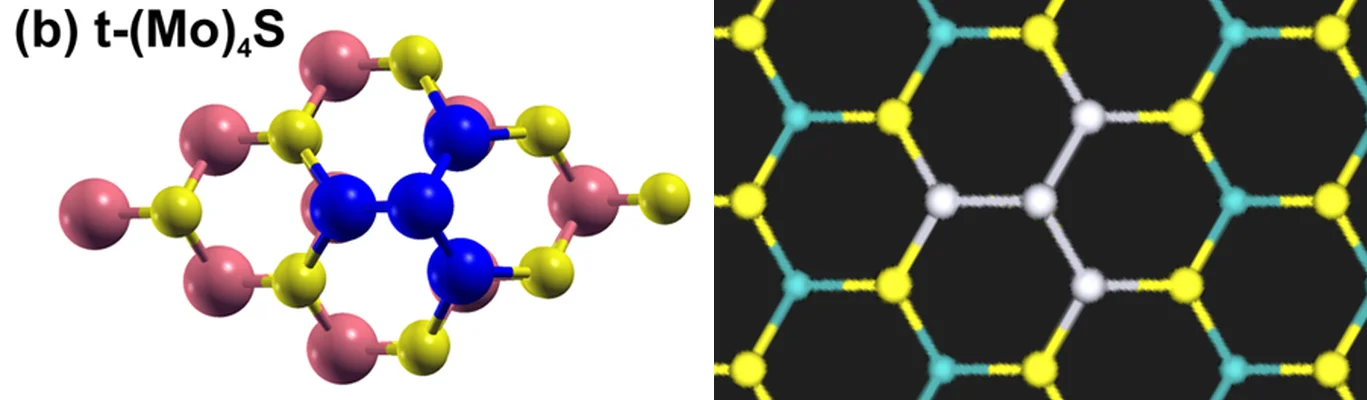
This tutorial builds upon the Pt Nanoparticles on MoS2(001) Surface via Adatoms tutorial, where the structures are created. Here, the binding energy is calculated using Quantum ESPRESSO with Eq. 1 of the manuscript, E_b = (1/n) [E(MoS₂ + Pt_n) − E(MoS₂) − n E(Pt atom)], against the isolated Pt atom: for the t-(Mo)₄-S cluster (n = 4, three Pt atoms on top of Mo and the fourth above S) and for one Pt atom on top of Mo (n = 1). The figure below shows the t-(Mo)₄-S cluster from the manuscript and from the structure notebook:
2. Prerequisites
Before starting this tutorial, one of the following steps should be completed:
- Follow the Pt Nanoparticles on MoS2(001) Surface via Adatoms
tutorial, using the
defect_point_adatom_island_molybdenum_disulfide_platinum.ipynbnotebook embedded in its section 6, to create and saveMoS2 5x5 monolayer(75 atoms),MoS2 5x5 Pt1 atop Mo(76 atoms) andMoS2 5x5 Pt4 t-(Mo)4-S(79 atoms), OR - Have the three materials saved in the
uploadsfolder or in the account's materials collection
3. Workflow overview
The binding energy calculation consists of the following steps:
- Set up the environment and parameters: Configure material names, the Pt atom box, the model, and compute resources
- Authenticate and initialize API client: Connect to the platform
- Load materials: Import the three slabs, build the isolated Pt atom, print their compositions and cells
- Configure the model: One Density Functional Theory (DFT) model for every job
- Configure compute resources: Select the cluster, queue, and processor settings
- Relax the three slabs: At fixed cell, at the Γ point, with the dipole correction
- Compute the isolated Pt atom: One spin-polarized Total Energy job at the Γ point
- Retrieve results: Eq. 1 for Pt₄ and Pt₁, and the mean bond lengths of the relaxed Pt₄ cluster
- Compare with the manuscript: Print the binding energies beside Table 1's
4. Calculation parameters
| this tutorial | Saidi | |
|---|---|---|
| Code | Quantum ESPRESSO | Vienna Ab initio Simulation Package (VASP) |
| Functional | Perdew-Burke-Ernzerhof (PBE), no van der Waals correction | PBE, no van der Waals correction |
| Pseudopotentials | ultrasoft (GBRV) | projector augmented-wave (PAW) |
| Cutoff | 40 / 200 Ry | 350 eV |
| Cell | 5×5 monolayer, a = 3.196 Å (Standata; publication 3.18 Å); 75, 76 and 79 atoms in one 15.98 × 15.98 × 26.27 Å cell | 5×5 monolayer, a = 3.18 Å, vacuum over 10 Å |
| k-points | Γ | Γ |
| Smearing | Fermi-Dirac, 0.05 eV | Fermi-Dirac, 0.05 eV |
| Dipole correction | along z, on the three slabs | on the slabs |
| Relaxation | all atoms, fixed cell, 0.005 eV/Å, at most 10 ionic steps | all atoms, 0.005 eV/Å |
| Spin, slabs | not spin-polarized | not spin-polarized, the supported clusters being non-magnetic |
| Spin, Pt atom | nspin = 2, total magnetization 2 |
spin-polarized, two unpaired electrons |
| Pt atom box | 12 Å cube | not stated |
5. Step-by-step instructions
5.1. Open the notebook
Navigate to the API examples repository and open the binding energy notebook:
1 | |
5.2. Configure parameters
Cell 1.2 sets the material names and the box of the isolated Pt atom:
1 2 3 4 5 6 | |
Cell 1.4 sets the DFT model; each comment names the manuscript's setting:
1 2 3 4 5 6 7 8 9 10 11 12 13 14 15 16 17 18 19 20 21 22 | |
5.3. Run the notebook
Execute all cells by selecting Run > Run All from the menu. The notebook first authenticates with the platform, then runs the steps listed in section 3.
5.4. Monitor progress
The notebook polls the three relaxations, then the Total Energy job of the Pt atom.
5.5. Analyze results
The output comes in three groups: the residual force each relaxation ended with, one line per material; the mean Pt-Mo,
Pt-S and Pt-Pt distances in the relaxed Pt₄ cluster, over the pairs under BOND_CUTOFF; and the binding energy per Pt
atom from Eq. 1. Each quantity is printed twice: the notebook's own values first, then the same lines headed "… from the
manuscript" with Table 1's values.
1 2 3 4 5 6 7 8 9 10 11 12 13 14 15 16 17 18 19 20 21 22 | |
6. Expected results
6.1. Comparison with published results
| E_b (eV per Pt atom) | Pt-Mo (Å) | Pt-S (Å) | Pt-Pt (Å) | |
|---|---|---|---|---|
| Pt₄, t-(Mo)₄-S (Fig. 4b), Saidi Table 1 | −3.43 | 2.91 | 2.35 | 2.61 |
| Pt₄, t-(Mo)₄-S, this tutorial | −3.545 | 2.872 | 2.356 | 2.616 |
| Pt₁, on top of Mo (Fig. 1a), Saidi Table 1 | −2.83 | 2.76 | 2.29 | — |
| Pt₁, on top of Mo, this tutorial | −2.859 | not computed | not computed | — |
The printed mean Pt-Pt distance, 2.616 Å, is the mean of the three apex-base pairs; the three base-base pairs are at
3.00 Å, at Table 1's 3 Å cutoff (BOND_CUTOFF), and are not counted; Table 1 gives 2.61 Å.
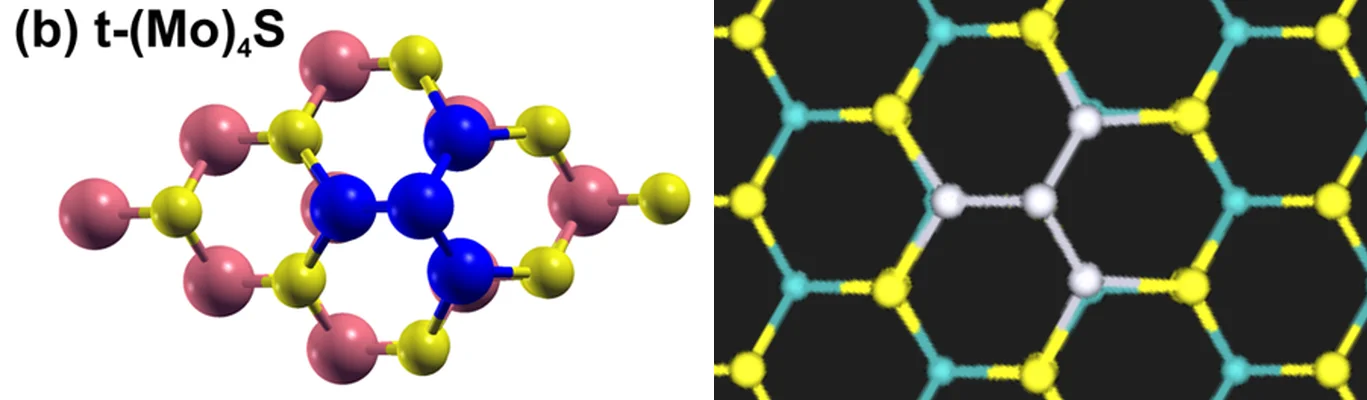
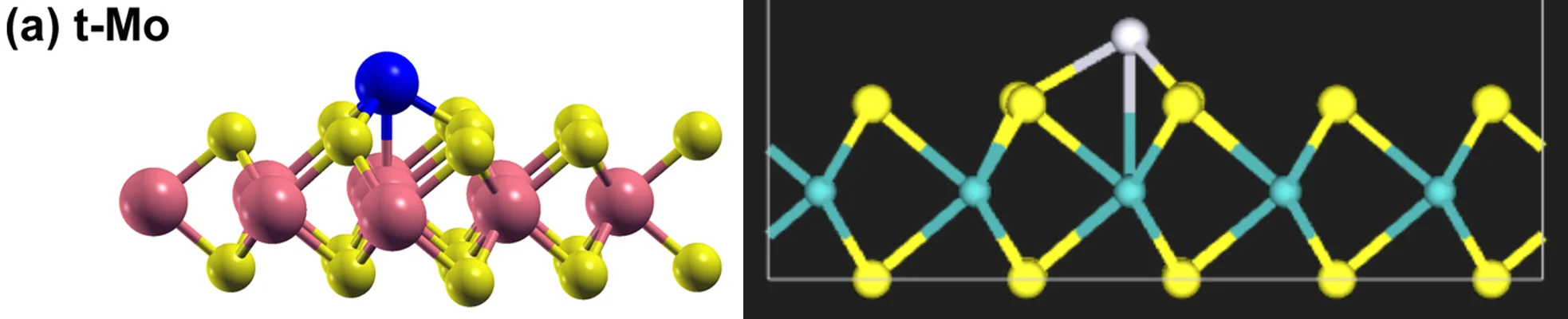
The relaxation jobs return these structures, named <name> relaxed <RELAX_TAG> by section 7.2 of the notebook:
7. Customization options
7.1. Adjust the isolated-atom box and the relaxation threshold
PT_ATOM_BOX in cell 1.2 is the edge of the cubic box around the isolated Pt atom. A new box is a new material, so the
Total Energy job of the Pt atom runs again. RELAXATION_SETTINGS in cell 1.4 holds the manuscript's force threshold,
0.005 eV/Å, which stays the stopping criterion, and nstep, the number of ionic steps after which each relaxation ends
inside TIME_LIMIT. In order to reach the threshold, raise nstep together with TIME_LIMIT, as far as the cluster
allows. Both values are part of the relaxation jobs' names, so a change relaxes the three slabs again.
7.2. Adjust computational resources
QUEUE_NAME, PPN and TIME_LIMIT in cell 1.3 set the queue, the cores and the time limit of every job. The default,
CLUSTER_NAME = None, uses the account's first listed cluster; setting a specific name picks that cluster instead,
and a name that is not available makes the notebook stop and list the ones that are.
7.3. Use the manuscript's settings
Apart from the code, the pseudopotentials, the cutoff and the lattice constant, section 4 follows the manuscript
wherever it states a setting; the Pt atom box, the fixed cell and the nstep bound are this tutorial's. In order to
match the manuscript's 3.18 Å instead of Standata's 3.196 Å, apply create_strain to the substrate in the structure
notebook before the slab is built, as in
Graphene on h-BN. The manuscript's PAW potentials
are VASP's and cannot be matched. Quantum ESPRESSO's are selected with PSEUDOPOTENTIAL_TYPE = "paw"; neither they nor
a cutoff for them is tested here, and the manuscript's 350 eV does not transfer. The structure notebook's 3x3 materials
are used by changing the three names in section 1.2.
8. Troubleshooting
8.1. Material not found
If a material of section 2 is not found in the uploads folder or the account's materials collection, run the
structure tutorial first; the names must match exactly.
8.2. No cluster available
If section 5.1 of the notebook prints an empty list of clusters, there is nothing to submit to, and section 5.2 stops.
8.3. Residual force above the threshold
A relaxation that stops on nstep ends with forces above the manuscript's 0.005 eV/Å, and Eq. 1 then uses the energy
of its last ionic step. In order to relax further, raise nstep as in section 7.1.
8.4. Binding energy far from the published value
Check the provenance printed in section 3.1 of the notebook first: the three slabs read Mo25S50, Mo25Pt1S50 and
Mo25Pt4S50, each in a 15.98 x 15.98 x 26.27 Å cell, and the Pt atom Pt1 in a 12.00 x 12.00 x 12.00 Å cell. Then
open the Total Energy job of the Pt atom, select the Files tab, and check
that pw_scf.in sets nspin = 2 and tot_magnetization = 2.
9. Interactive JupyterLite notebook
The following JupyterLite notebook calculates the binding energies of Pt on MoS₂. Select Run > Run All Cells.
10. References
-
W. A. Saidi. Density functional theory study of nucleation and growth of pt nanoparticles on mos2(001) surface. Crystal Growth & Design, 15(2):642–652, 2015. URL: https://doi.org/10.1021/cg5013395. ↩