Reaction Energy Profile with NEB (Quantum ESPRESSO)
This tutorial explains how to calculate the energy reaction profile and activation barrier via the Nudged Elastic Band (NEB) method, using interpolated sets of intermediate image structures (see the interpolated sets tutorial).
The example system is a one-dimensional, three-atom hydrogen (H3) molecule undergoing a collinear proton transfer reaction:
1 | |
In this reaction, the middle H atom breaks the bond with the first atom and forms a molecule with the third atom. This example is also available in the Quantum ESPRESSO documentation 1.
Quantum ESPRESSO version
This tutorial applies to Quantum ESPRESSO versions 5.2.1, 5.4.0, 6.0.0, 6.3, and later.
1. Understand the NEB workflow
Expand to view input parameter details
The workflow for NEB calculations with Quantum ESPRESSO contains a single unit.
Executable: NEB calculations use the "neb.x" executable. Input parameters are described in Ref. 4 of this page and can be customized via the unit input template editor.
Broyden algorithm: The Broyden algorithm is used instead of the default optimizer to remove oscillations in activation energies.
Number of images: The num_of_images parameter defines the number of image points discretizing the reaction path (must be > 3 including initial/final). This can be set under the "neb" section of Important Settings for automatic generation by Quantum ESPRESSO.
Convergence threshold: The simulation stops when the force orthogonal to the path is below path_thr (in eV/Å).
Image structures: Atomic positions for all images are specified within BEGIN_POSITIONS / END_POSITIONS delimiters, with each ATOMIC_POSITIONS card prefixed by FIRST_IMAGE, INTERMEDIATE_IMAGE, or LAST_IMAGE.
2. Create the job
Open the Job Designer to create a new job.
3. Import the interpolated set
The Interpolated Set generated in the interpolated sets tutorial under the name "NEB CONSTRAINED SET" should be selected and imported into the Materials tab by selecting all images in the set.
4. Select the workflow
Workflows for NEB calculations with Quantum ESPRESSO can be imported from the Workflows Bank into the account-owned collection. The workflow can then be selected and added to the job.
K-point grid for molecules
The k-point grid should be set to 1 × 1 × 1 under Important Settings, since the system is a molecule rather than a periodic crystal.
5. Submit the job
Before submitting, review the Compute tab to verify the compute parameters. H3 is a small system — 4 CPUs and a few minutes of runtime are sufficient.
6. Examine the results
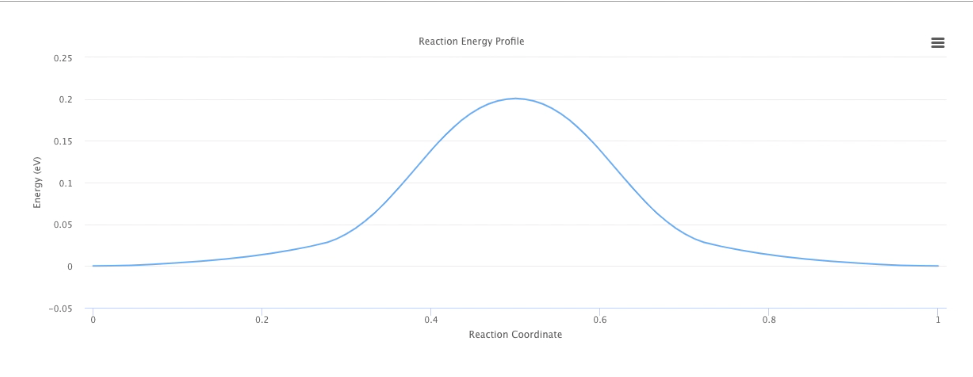
The Results tab of Job Viewer displays the Reaction Energy Profile as an energy curve versus the reaction coordinate.
The final optimized image structures can be retrieved according to the instructions in this page.
7. Video walkthrough
7.1. NEB with manually generated images
The animation below uses the constrained interpolated set containing 3 intermediate images generated in the interpolated sets tutorial. The activation barrier of ~0.2 eV is in good agreement with published results (see page 26 in Ref. 2).
7.2. NEB with automatically generated images
The same calculation can be performed with automatic intermediate image generation by Quantum ESPRESSO, eliminating the need to import an interpolated set manually. Set the number of intermediate images under Important Settings — only the initial and final images need to be imported.